Save an extra 10% off your order with code EXTRA10
Cherry Hunt Daily Progress 0/1000
User avatar

Rachel Kent

ACOT Employee

How To Submit To A Challenge
We're seeing some questions on how to submit to a challenge in our project gallery! Hopefully this helps! 🍒❤️


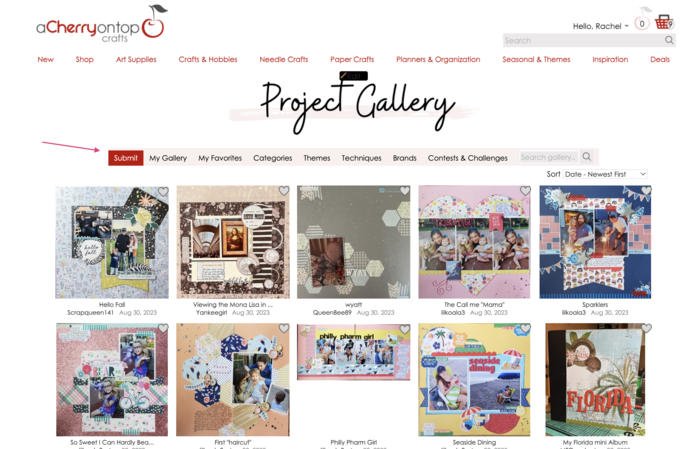
1) Log in and head to our project gallery. This can be found under our inspiration tab.
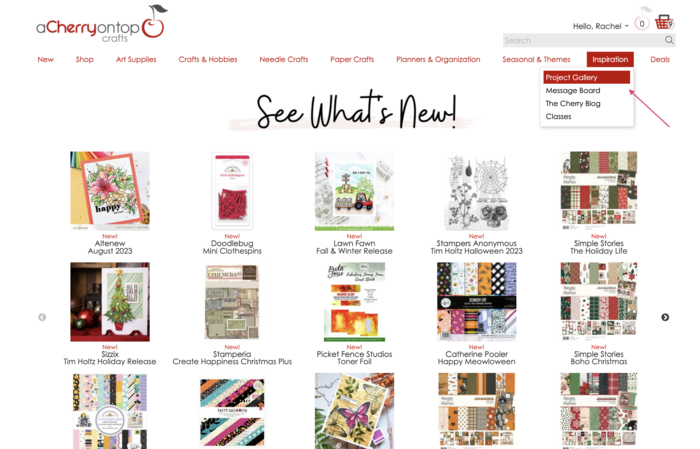
Image


2) Click submit on the gallery menu. 

Image


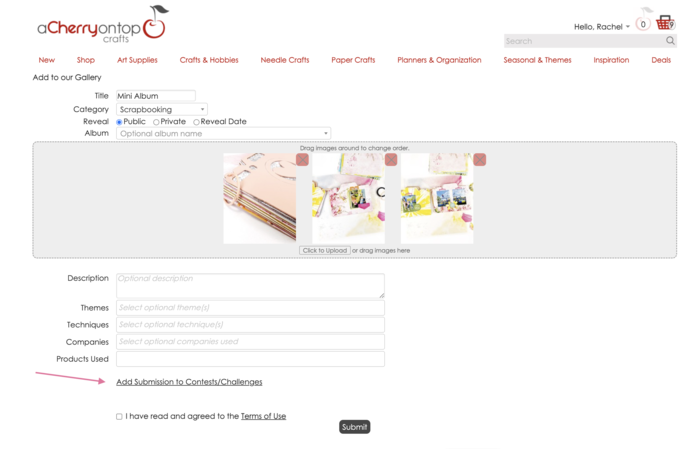
3) Add your photos and info, then click the link that says "Add Submission to Contests/Challenges". You won't see this option until you add your photos.
Image

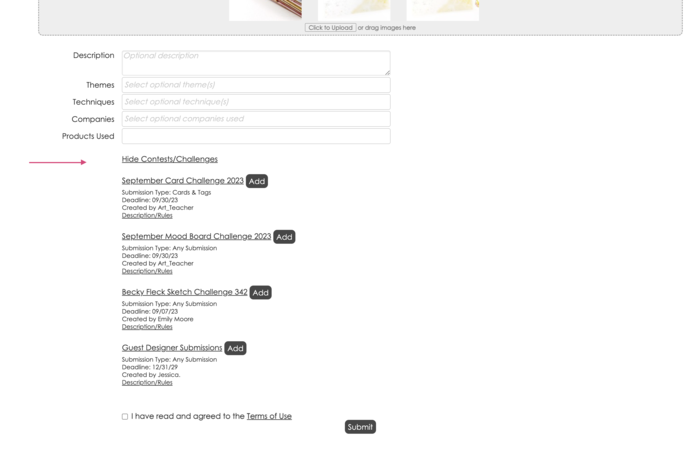
4) The challenges will pop up after clicking that link, then you click the add button to whatever challenge you are entering.
Image


What kinds of challenges are there? All kinds! You'll see them posted on our message board here:
viewforum.php?f=25

Some challenges may only require you to reply to that thread, so be sure to read the rules! Need help posting a photo on the message board? Here's a tutorial for that: viewtopic.php?f=359&t=274974


Happy crafting :)
 
User avatar

ScrappyFun

Cherry Tart

Re: How To Submit To A Challenge
Most challenges from NSD are not in the gallery this year
I forgot how to post  photos to the message board.
What is the best way for me to post my layout entry for the message board challenges?
Thanks in advance.
1 user liked this post:
User avatar

VickiR

Bowl Full of Cherries

Re: How To Submit To A Challenge
ScrappyFun wrote:
Mon May 04, 2026 11:29 am
Most challenges from NSD are not in the gallery this year
I forgot how to post  photos to the message board.
What is the best way for me to post my layout entry for the message board challenges?
Thanks in advance.

Here's a tutorial that Rachel posted.

Photos to the MB
1 user liked this post:
    ImageImage
User avatar

ScrappyFun

Cherry Tart

Re: How To Submit To A Challenge
Awesome! Thanks!
Post Reply

Return to “Announcements”

Information

Moderators

ACOT Employee